Why Use Webhooks?

Keep your application synchronized with CoinGecko in real-time β€” no cron jobs or polling required. Listen to events like cg.coin.info.updated and react instantly to changes.

Automated Asset Updates

Update your UI when a token rebrands, changes ticker, or updates its logo.

Cross-Chain Monitoring

Detect when a project deploys on a new chain or migrates a contract address.

Risk & Compliance

Act immediately on critical alerts β€” malicious activity warnings or contract migration notices.
CoinGecko Webhooks (Beta) is available for paid plan customers (Analyst plan & above).
  • Credit charge: 10 credits per event delivery. Retry attempts are not charged.
  • Maximum webhook endpoints: 5.
  • Enterprise clients who need higher limits β€” contact your Customer Success Manager.
CoinGecko Webhooks is a supplementary delivery mechanism for real-time notifications. Currently in beta β€” excluded from the SLA applicable to the CoinGecko API Platform.

Share Feedback

Help us improve Webhooks β€” share your suggestions and use cases.

Getting Started

1

Create a webhook

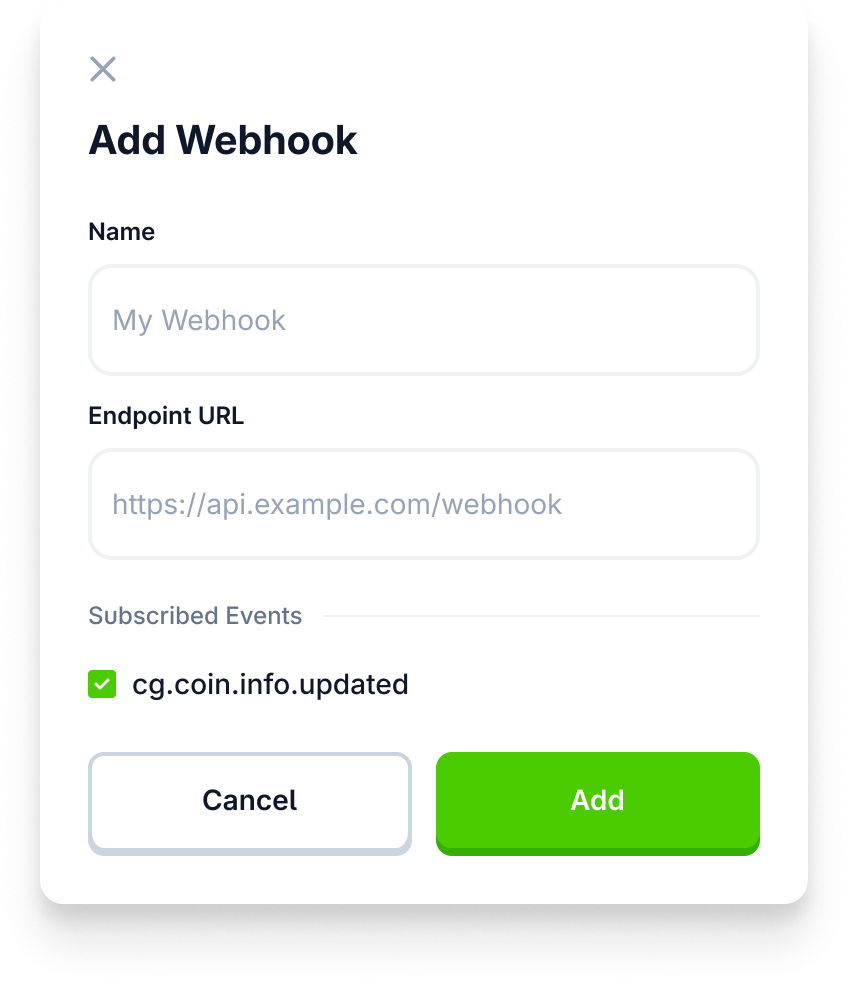
Go to the Developer Dashboard and create a new webhook endpoint.
2

Get your Signing Secret

Use the Signing Secret to verify incoming payloads on your server.
3

Start receiving events

Your server will receive POST requests whenever relevant coin data changes on CoinGecko.com.
For team accounts, non-owner users invited to a shared dashboard have full access to view, edit, and delete webhooks.

Event Types

Event TypeDescription
cg.coin.info.updatedCore coin information updated (metadata, links, categories, etc.)
cg.coin.price.updatedCoin crosses a user-defined price target
cg.coin.listedNew token indexed and listed on CoinGecko
More coming soon!Share your suggestions

HTTP Headers

Every webhook POST request includes these headers:
HeaderDescription
Content-Typeapplication/json
x-cg-timestampUNIX timestamp of the event. Useful for replay attack prevention
x-cg-signatureHMAC SHA256 signature to verify authenticity
x-cg-event-idUnique identifier for the event

Signature Verification

Verify that incoming payloads are genuinely from CoinGecko by computing an HMAC SHA256 hash and comparing it to the x-cg-signature header. Signing string format: {timestamp}:{event_id}:{json_body}
The {json_body} must be the raw, unparsed request body β€” not a re-stringified JSON object.
If your framework auto-parses JSON before verification, the signature will fail.

Example Code

Replace YOUR_SIGNING_SECRET with the whsec_... value from your Developer Dashboard.
const { createHmac } = require('crypto');
const express = require('express');
const app = express();

const SIGNING_SECRET = 'YOUR_SIGNING_SECRET';

function verifySignature(body, headers, secret) {
  if (!secret) return null;

  const timestamp = headers["x-cg-timestamp"];
  const eventId = headers["x-cg-event-id"];
  const signature = headers["x-cg-signature"];

  if (!timestamp || !eventId || !signature) return null;

  const signingString = `${timestamp}:${eventId}:${body}`;
  const expected = createHmac("sha256", secret).update(signingString).digest("hex");

  return expected === signature;
}

app.post('/webhook', express.raw({ type: 'application/json' }), (req, res) => {
  const rawBodyString = req.body.toString('utf8');
  const isValid = verifySignature(rawBodyString, req.headers, SIGNING_SECRET);

  if (isValid === null) {
    return res.status(400).send('Missing required CoinGecko headers');
  }

  if (isValid) {
    const event = JSON.parse(rawBodyString);
    // Process the event...
    return res.status(200).send('Webhook received successfully');
  } else {
    return res.status(401).send('Invalid signature');
  }
});

app.listen(3000, () => console.log('Server listening on port 3000'));
Treat your Signing Secret like a password β€” never commit it to public repos or expose it in client-side code.

Managing Webhooks

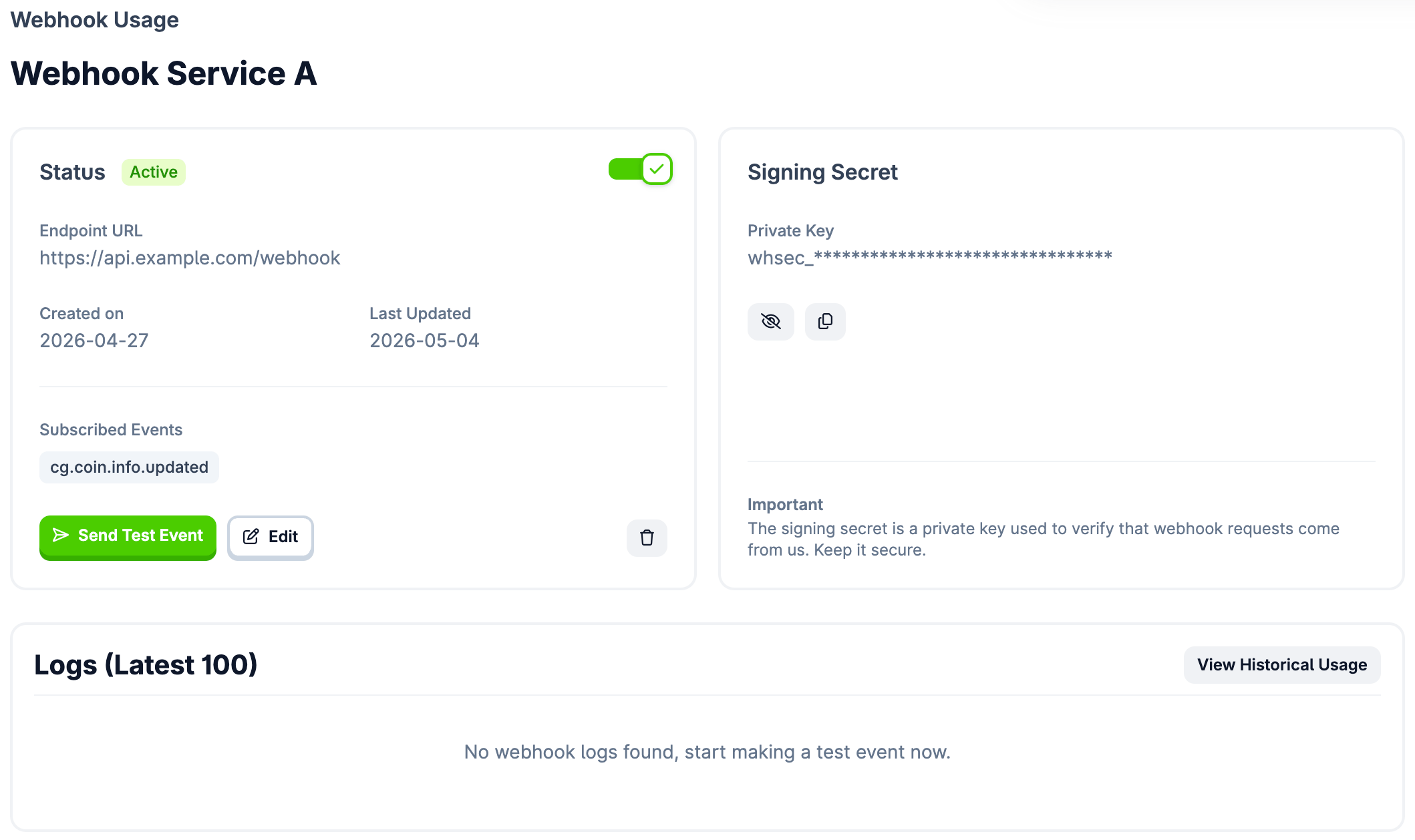
Navigate to your Webhook Details page in the Developer Dashboard:
  • Send Test Event β€” dispatches a mock cg.coin.info.updated payload. Use it to verify your server receives the request and responds with 2xx before going live.
  • Delivery Logs β€” view the latest 100 delivery attempts. Use these to identify if your endpoint is rejecting requests.

Billing & Credits

  • 10 credits per event delivery. Retries are not charged.
  • If you run out of credits with Hardcap enabled (Overage disabled):
    • Delivery stops immediately and all webhooks are auto-disabled.
    • You’ll receive an email notification that delivery has stopped.
    • You must manually re-activate webhooks in the Developer Dashboard after credits are replenished.

Estimated Usage

Each delivered webhook event consumes 10 credits. The cg.coin.info.updated event listens to all active coins on CoinGecko β€” volume fluctuates based on market activity and how frequently projects update their metadata.
  • Expected volume: up to 200 updates/day based on historical data.
  • Estimated monthly cost: ~6,000 events/month = ~60,000 credits.
  • Plan fit: comfortably within the Analyst plan and above.
These are approximations. Extreme market volatility or mass migrations could temporarily increase daily volume.

24-Hour Baseline Test

If you’re concerned about unpredictable credit usage, run a short test before committing:
  1. Enable Hardcap β€” turn OFF β€œOverage” in the Developer Dashboard to avoid unexpected charges.
  2. Run for 24–48 hours β€” activate your webhook and let it collect events.
  3. Check consumption β€” review credit usage in the dashboard to establish a reliable baseline.

Retries & Failed Attempts

If your server fails to respond with a 2xx status code, CoinGecko will retry with exponential backoff. Retry attempts are not charged. A webhook is automatically disabled under either condition:
ConditionThreshold
Single event backoff14 failed retries over ~24 hours
Aggregate failure cap300 failed retries across 12 hours
When a webhook is disabled, you’ll receive an email notification. To resume:

  1. Check your server logs and resolve the issue.
  2. Log in to the Developer Dashboard.
  3. Manually toggle the webhook back to Active.